Item added to cart ×

Shielded Cables – Braided vs. Spiral Shielding

Shielded Cables – Braided vs. Spiral Shielding

Shielded Cable – Braided vs. Spiral Shielding

Cables today have an infinite number of designs and purposes. Outside of musical equipment, cables of the same build help run video, computers, and telephone and video networks. Cables using more than a single conductor tend to use twisted pair construction. One major area where construction still differs from cable to cable is in its protection; its shielding. Today, we’ll be discussing the differences between braided and spiral shielding. It’s important to note that each type has its own unique advantages and disadvantages so we’ll let you be the judge on deciding which one is the best fit for you.

Twisted Pair Cabling

First, let’s talk about what’s inside of a typical cable. Twisted Pair cabling is the industry norm used for multi-conductor cables on the market. By standard definition, “twisted pair cabling is a type of cabling in which two conductors of a single circuit are twisted together for the purposes of improving electromagnetic capability.” But what does it mean?

In short, a twisted pair can be used as a balanced line – which greatly reduces the amount of noise transmitted through the cable. What the “twisting” provides – in theory – is that the currents in each of the cables are near equal. The twisting simply ensures that each is equal distance from the interrupting source – which would in turn, affect them equally. On the other hand, twisted pair cable’s resistance to interference depends on the twisting scheme to remain in place, and so its efficiency can vary.

Now let’s look at shielding, the first line of defense against external interference in a traveling signal.

Spiral Shielding

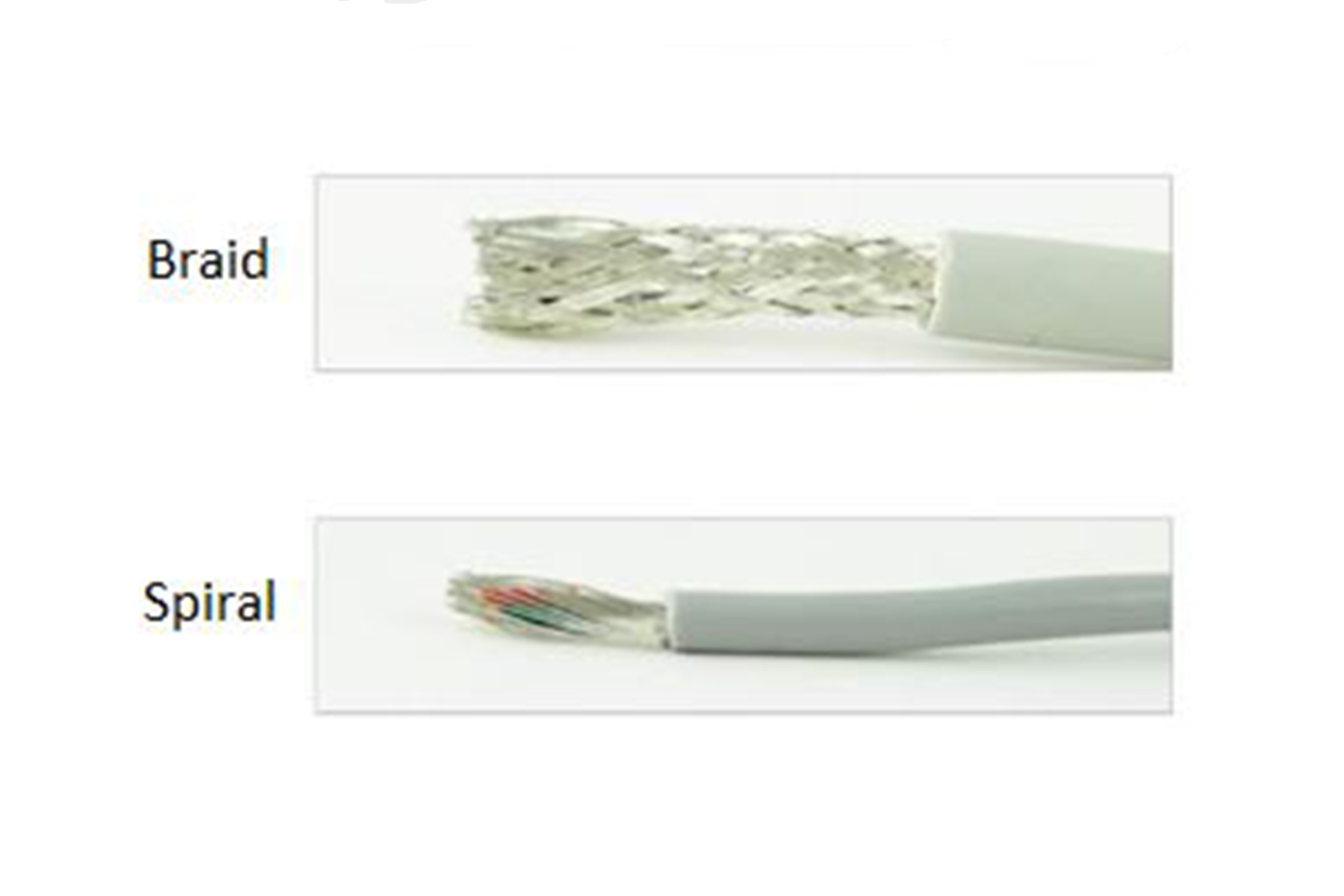
This is a spiralling shield of strands of copper running parallel that is made fairly inexpensive. Since the ends of the cable do not need to be untangled, its build can be done pretty quickly.
Because the strands are in a spiral – it is easier to extend. The stretching, theoretically, makes the strands less likely to break when pulled. When the cable is bent or twisted, the spiral strands can gap apart – allowing exposed areas – resulting in frequency interference. For example, patch cables are generally bent and twisted the most – so spiral shielding may not be the best fit for such use, whereas for guitar cables, it’d make more sense.

Advantages of Spiral Shielding

  • typically cheaper to make
  • easy handle and installation

Disadvantages of Spiral Shielding

  • easier for frequency to slip through exposed areas
  • breakage is much more frequent

Braided Shielding

Braided shielding is the most “traditional” form of shielding. Braided cables are woven – thus making it much more difficult to assemble. Typically, braided shielding is stiffer and just as flexible.

Advantages of Braided Shielding

  • as strong as it is flexible
  • can be installed next to products without power loss
  • performs best at low frequency

Disadvantages of Braided Shielding

  • does not guarantee 100% coverage as its coverage is dependent on how tightly it is woven
  • typically, a bit bulkier

If You Wish To Learn More

Part of audio quality is in cancelling or limiting noise that the conductor picks up between sources. In the case of balanced cables, shielding is less important because they typically transmit line-level audio signals that don’t need to be boosted, and part of their design is to carry two identical signals in opposite polarity before reversing one in the end, which cancels the noise. Hosa carries both a variety of cables with braided and spiral shielding.

For more information on cable shielding and signal flow, check out our video on Do Cables Matter?

Hosa

Artist Spotlight: Miles Dimitri Baker

Why Quiet Matters (in Cables)

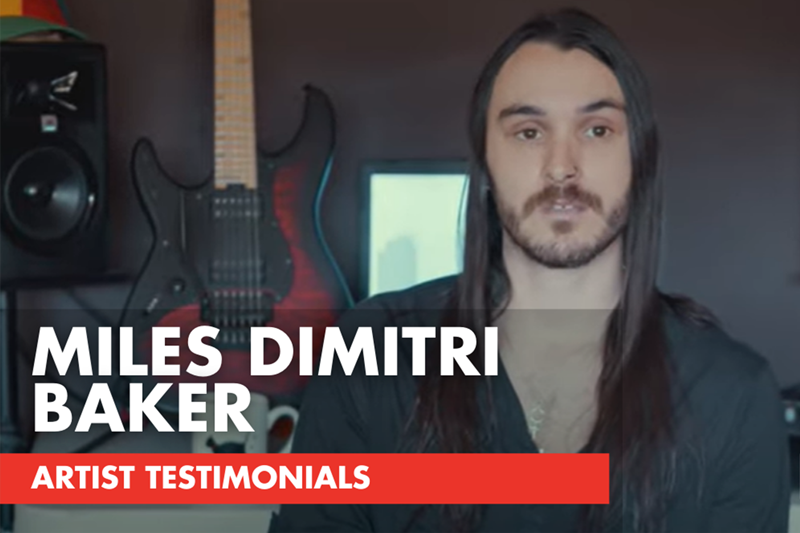
Cables have a pretty thankless job. The best ones work all the time and you never hear about them. And that’s exactly what they should do. Miles Dimitri Baker, guitarist and part of the band Interloper, said it best:

“You can’t have noise. It’s, like, not an option. So if someone asks [which cables to buy] I’m going to say Hosa because that’s what I personally use on all of my gear.”

This month, we were fortunate enough to meet with Miles in his home studio and he fills us in on his creative process and why Hosa cables are the best fit for him.

Miles Dimitri Baker, Artist and Guitarist, Interview

VIDEO TRANSCRIPT
One of my favorite things about music is obviously the emotion it can create. It gives you a feeling, you know you hear a song and it can take you back to a place in your life, like a memory or it can give you a feeling whether it’s like sadness or triumph or any of those types of emotions. Music has the power to do that.

Hey, I’m Miles Dimitri Baker. I’m a musician, I play in the band Interloper and I also teach music. And this is my cat, Sabrina. I like the things I’ve been able to do with it, honestly. You know, I’ve been able to put music out and people enjoy what I do which, I think, for most people – at the end of the day people feeling appreciated, you know, is a basic human need. So I feel really lucky and fulfilled that way.

The creative process for me can be different. It almost starts, sometimes, like a calculated approach. For certain things, you know, do I find this certain chord progression in like its purest form – you know, through position triads or 7th chords. Do I find that, like, appealing? And then it becomes like a manipulation process – of like – how can I make this actually sound cool, in like, an actual musical idea. You know, taking sort’ve like a more like calculated, sort’ve scholastic approach to it and then like really manipulating it. That’s a lot of times my approach for it and then other times, you know, you really get that where you’re hearing something and you’re like, “Oh wow, I need to record, like, right now.” And that’s really exciting, turning that and developing it. Same kind of approach, like, “what’s really going on here?” What do I hear next, if I don’t hear something next, maybe I’ll hear, like, the structure of it. Maybe, what harmonically is going on that, maybe I can use to get to this next section that I have yet to have an idea for.

Every little thing that becomes like an ease abuse type situation. It’s the smoothness in which that workflow is interrupted by saying like, “how do I do this or I need to go get this, or whatever.” You know, I have the ability to run things however I want.

Every single piece of gear I have in here is using Hosa cables (laughs). Literally everything. Every single piece – from the monitors to all of my rack stuff to any sort of connection running to like, this cab. Speaker cables, power cables, it’s all Hosa. You know, they’re durable, they sound good, they’re quiet – that’s another thing that’s worth mentioning with cables. Some cables are noisy. If you’re trying to track like a DI guitar, or you know, re-amp something, you can’t have noise. Or if you’re running cabling through FX things like a reverb pedal or delay pedal, you know, your tuner to your guitar. You can’t have noise, you know? It’s like not an option so it’s nice having dependable things. It’s like, I literally use them for everything – so if someone asks I’m going to say Hosa because that’s what I personally use on all of my gear.

Popular Hosa Cables and Accessories for Guitarists (H2)
Hosa Edge Guitar Cable
Every electric guitarist needs a guitar cable. Our Edge series are designed to provide a lifetime of outstanding performance.
Goby Labs Guitar Care Kit
Inevitably when you use music and audio equipment, you’re going to get some wear and grime build-up and potentially expose yourself to unwanted germs. Our Goby Labs Guitar Care Kit can help with that.
Pro Headphone Extension Cable
Our Pro Headphone Extension Cables are designed to extend the reach of hard-wired headphones. These are especially useful when playing your instrument away from your console or DAW.

Hosa

Best Gaming Setups

Best Gaming Setup & Equipment

Gaming Industry

The gaming industry has grown to a near $200 billion market that continues to push the boundaries of technology and entertainment. Once a niche market, the industry has undoubtedly launched into the mainstream. E-sports, in 2021, is just as respected as any other major professional sports organization – with personalities and content creators just as big as any other high level athlete. The industry continues to grow and there aren’t any signs of it slowing down.

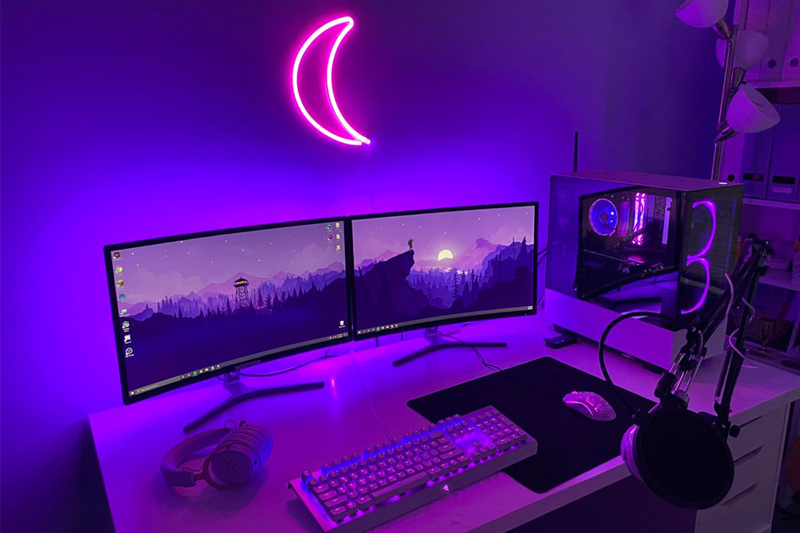
The gaming industry’s competitive nature has allowed the sport to grow tremendously – creating opportunities for not only competitive gamers, but coders, programmers, designers and artists of all kinds. Today, we’re going to take a look at two different gaming setups: one for gamers just starting out and another for gamers looking to get into the competitive part of the sport.

What Do You Need for a Gaming Setup?

Gaming Equipment and Parts

Before heading out to make any purchases, there are definitely some key gaming equipment and accessories you should know about that will make your gaming setup efficient.

Central Processing Unit (CPU)

The Central Process Unit is the principal part of any digital computer system, generally composed of the main memory and control unit. This enables your computer to interact with all of your applications and programs installed. Generally, the faster your CPU, the easier it is to use the computer.

Graphics Processing Unit (GPU)

Have you ever wondered why the images or videos on your computer screen take a while to load? The problem is likely your GPU. GPU’s are designed to accelerate the rendering of 3D graphics.

Random Access Memory (RAM)

This is your computer’s short-term memory storage. It stores information that is being actively used, so it can be accessed even more quickly.

Motherboard

The motherboard is the backbone that ties the computer’s components together at one spot and allows them to talk to each other. Without it, the computer’s CPU, GPU, etc could never communicate to each other.

Power Supply Unit (PSU)

The PSU converts mains AC to low-voltage regulated DC power for the internal components of a computer. Modern personal computers use switched-mode power supplies.

Hard Disc Drive (HDD)

HDD is storage that lives internally in your computer. Because it is part of the computer, its data is stored and read on the disc. It works similarly to that of a turntable – with an LP record and needle on the arm.

Solid State Drive (SSD)

Generally, SSD’s are much more expensive than HDD’s. The reason being they have no moving parts and are compact. They can be the size of a stick of gum, yet can hold more storage and be accessed quicker than an HDD.

Casual Gamer Intro Setup

CPU: AMD Ryzen 5 5600X
GPU: RTX 2060 Ti (or better)
RAM: Corsair Vengeance LPX 8 GB
Motherboard: ASUS Prime A520M-A
PSU: Corsair RM650
HDD: Seagate BarraCuda 1 TB
SSD: Samsung EVO 860 250 GB
~$900

Competitive Gamer Intro Setup

CPU: Intel i9 9700K
GPU: RTX 3090
RAM: Corsair Vengeance RGB Pro 32 GB
Motherboard: ASUS Prime Z390-A
PSU: Corsair RM 1500x
HDD: Seagate FireCuda 2 TB
SSD: Samsung 870 1 TB
~$2,000

What We Like About These Builds

If you’re new to the market, there are a few reasons why we recommend these base setups. Aside from the price – which we believe is the most bang for your buck – these setups, we feel, would guarantee a smooth, non-interruptive gameplay. However, we highly recommend adjusting your setup to fit your needs.

Your Gaming Space

Lastly, when planning your gaming setup it is imperative to know exactly what you will need to ensure all of the parts connect. At Hosa, we carry the most efficient USB Cables & Adapters in the market. For example, if you’re looking to mirror your monitor or displays, use HDMI cables. If you have a USB hub and want to charge your phone, try our USB to USB-C cables.

Here’s a full list of Hosa products that may help with your gaming setup:
SuperSpeed USB 3.1 (Gen 2) Cable
SuperSpeed USB 3.0 Cable
Pro Headphone Extension Cable
Pro Microphone Cable

Patch Bays: A Beginner’s Guide

Patch Bays: A Beginner’s Guide

As your recording setup grows from a laptop with a few plugins to include more outboard gear, the process of getting behind your desk and changing cables to adjust the signal chain becomes more and more time-consuming. This is when recording professionals and amateurs alike should invest in patch bays, which allow for quick and simple connections to be made on the fly from an arm’s reach. We’ll take you through a quick guide into what patch bays are, how they work, and the different kinds available.

What is a Patch Bay?

A patch bay is a hub that allows you to control your inputs and outputs from any device connected to it. In most cases, the patch bay comes in rack format, so it can be set in the same rack as the rest of the outboard gear in use. Once in place, all the connections from other pieces of hardware are made in the back, with the front reserved for the user to create or add to the chain using patch cables.

Types of Patch Bays

When looking into a patch bay setup, you’ll come across different types based on their “normalling” capabilities. Normalling refers to how the patch bay in question deals with signal flow in and out of the patch bay. Some allow you to control the types of normalling, while others are strictly made with one type of normalling, so it’s important to know what they mean before purchasing.

Full-Normal Patch Bays

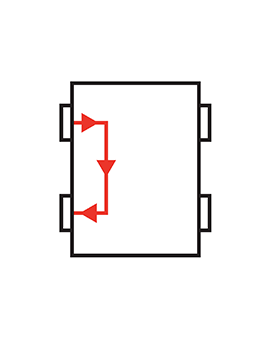
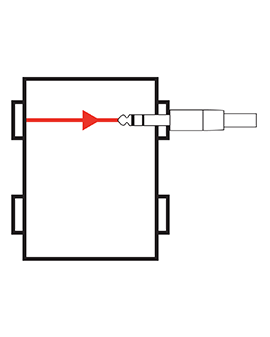
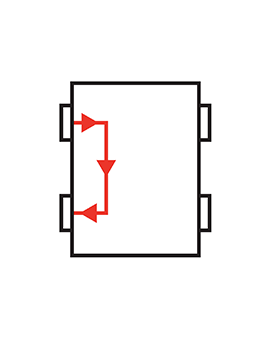
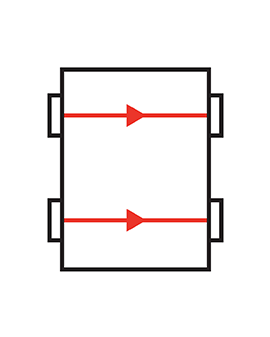
For a full-normal patch bay, the traditional setup includes running your device outputs to the top row on the back of the patch bay, allowing you to then route through the corresponding inputs below it. If a patch cable is connected in the front, whether to the input or output, that original link in the back is broken and it is instead routed directly through the patch cable.

Half-Normal Patch Bays

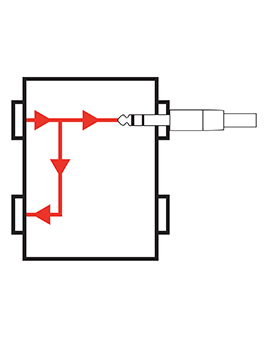
Much like a full-normal patch bay, a half-normal patch bay routes the output on the back through the corresponding input below it. Unlike the full-normal patch bay, that link is not always broken with the use of a patch cable. When you insert a patch cable into the bottom row, the input jack, the link will be broken and the input device will receive only the signal connected by the patch cable. However, when a patch cable is connected to the top row (output jack), the original link is not broken. The signal continues to the normalled input with a duplicate of the signal running through the patch cable. This comes in handy in a dry/wet recording, which is where one signal is fully affected with other pieces in the signal chain while the other is not.

Non-Normal (or De-Normal) Patch Bays

A non-normal patch bay is when none of the points are routed until a patch cable physically routes them. This is a more time-consuming setup and requires many more patch cables, but allows you the greatest flexibility to route complex signal chains.

Some patch bays, like the Hosa MHB-350 Patch Bay Module allow for you to choose the normalling you need, like half-normal or de-normal.

Throughput Patch Bays

Sometimes a patch bay isn’t necessarily to create complex chains, but simply to hide cable clutter behind the desk or rack and turn the corresponding jacks on the front into direct “throughputs”. Throughput, or “point-to-point” patch bays like the Hosa PDR-369 and MXL-369 XLR Patch Bays, allow all the connections to be made behind the patch bay so a single cable can be used when any of the inputs or outputs are needed.

Make a Plan for your Patch Bay

When setting up your patch bay, the best starting point is to see how many inputs and outputs you will need, then what kind of normalling will be required, and finally drawing out the wire diagram to know how your connections will be made. Some patch bay manufacturers even offer blank templates to help you visualize and plan your signal routing.

It’s also important to know whether you plan on running any mic setups that require phantom power so you can get the right patch bay to accommodate those requirements.

Patch Cables

Once you have your plan, you will know approximately how many patch cables and what length you’ll require. Several different patch cable types are used with patch bays, but the most common are TT Type TRS cables and ¼” TRS cables. It’s important to check if your needs and patch bay are TRS (balanced, stereo) or TS (unbalanced, mono). If you have a TRS patch bay, you’ll need TRS patch cables otherwise you won’t be able to pass a true balanced signal.

Organize, Organize, Organize

The purpose of a patch bay setup is to keep your signals clean, but also your physical environment by cutting down cable clutter. Don’t overlook how helpful simple organizational tools can immediately solve headaches. Some of the obvious ones are using scribble-strip tape to label the equipment or output assigned to each jack on the front. You can also label the cables themselves. Cable ties and split looms will keep cable clutter under control behind the desk, as well. For cables not in use yet, rather than stuffing them somewhere or having them sprawled around, you can invest in a cable holder to keep your space tidy and your cables quickly accessible.

To purchase Hosa patch bays and other organization tools, visit our Shop page. Happy patching!

Hosa

Hosa Artist Testimonials | Destiny Petrel

Don’t Let Cables Affect Your Workflow

When creating music, the last thing an artist wants to think about is whether or not a cable is working. At Hosa, we pride ourselves on our cables’ reliability and longevity. No matter where you are in your career, our cable selection will help you get the job done. But don’t take just our word for it.

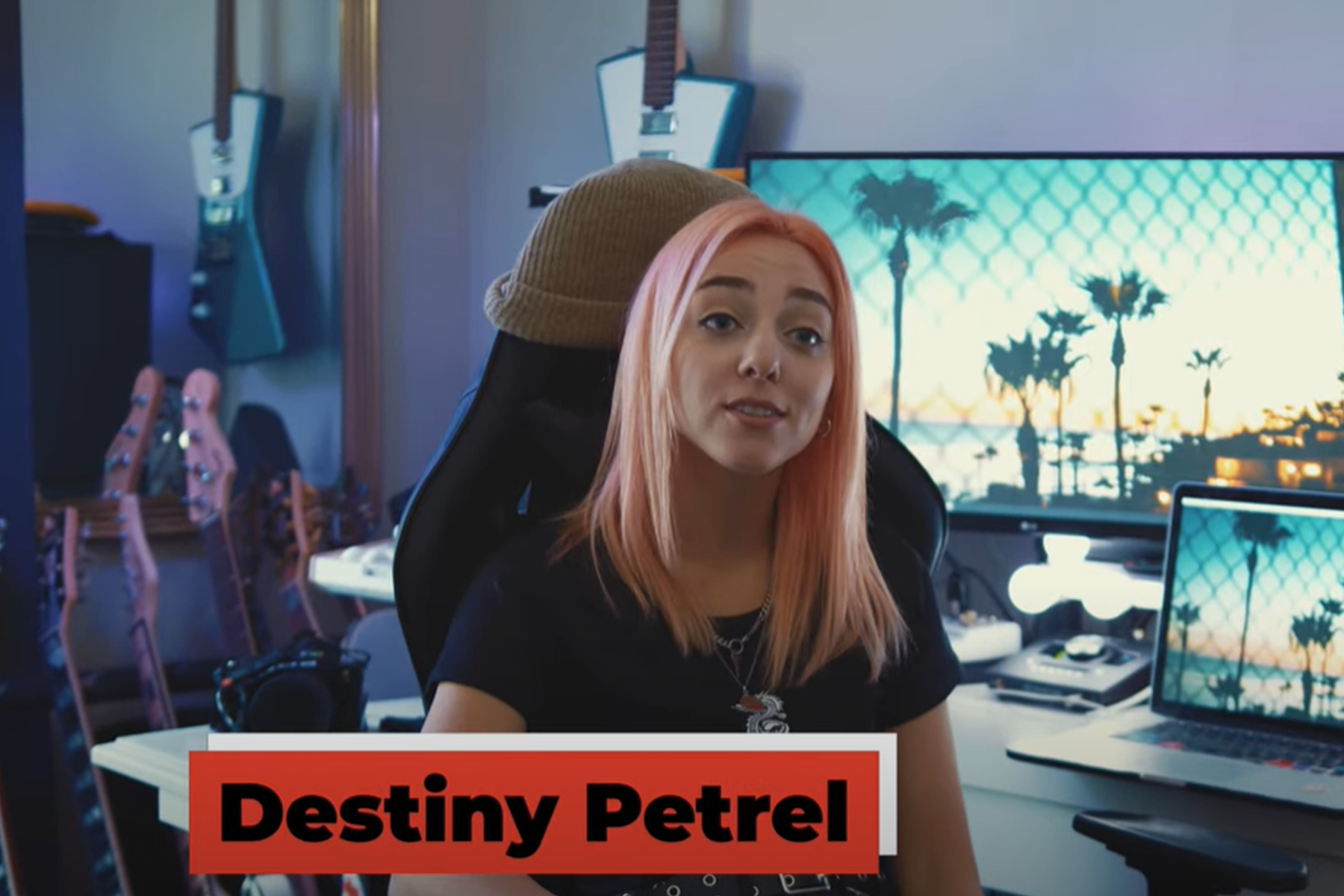
This month, we were fortunate enough to link with Destiny Petrel, a singer/songwriter, producer and artist based out of Los Angeles. Destiny writes and produces her own music right from her bedroom and has been using Hosa cables for over five years.

Destiny Petrel, Artist and Guitarist, Interview

video transcript:
All my family are musicians so growing up in a musical home, it was very easy to grab anything musical instruments everywhere – pianos, guitars. So, I gravitated towards the guitar. I’ve been playing fifteen years and I absolutely love it. It never gets old.

Hey, I’m Destiny Petrel. I’m a singer/songwriter and musician/guitarist from New York living in L.A. My favorite thing about playing is it takes me to another place. And I absolutely love that feeling. I can be in any type of mood and even change my mood, which I love.

Well, what I love to do most is make music. Now, I’ve produced my own record. My first single is coming out December 11th. It’s an EP that will come out next year of five songs. The first single ever that I’ve written and produced by myself is finally coming out. Yeah, this is where I recorded everything.

Hosa’s helped me be able to run everything – power supplies, I’ve used a lot of XLR’s – XLR cables. Reason being is I do change a lot of my stands. So, of course like, different size XLR cables. And the ¼” cables, I only use Hosa and a lot of the ¼” cables are coming through from my speakers and for my guitars mostly. Of course for touring as well because I use a lot of the ¼” cables for guitar. They’re the best.

The best thing about Hosa is that they last a very long time. These XLR cables – I’ve lasted with them about five years. And the ¼” cables I use for guitar – it’s been used that I’ve used the same ones. That’s what’s awesome about it. But what’s even better is that it’s affordable on top of like, the quality which is so great for any addition. Anybody who’s a producer, guitarist, literally anyone.

I’ve tested many different cables. Their cables are more clean than any other cable and that’s what I do love about them most is I don’t get any static. No hissing. That’s why their cables are super reliable too because especially when you’re recording. You need that and so this just helps me everyday to run everything that I need to run for recording for guitar, all of it.

Popular Hosa Cables and Accessories for Guitarists

Hosa Edge Guitar Cable
Every electric guitarist needs a guitar cable. Our Edge series are designed to provide a lifetime of outstanding performance.
Goby Labs Guitar Care Kit
Inevitably when you use music and audio equipment, you’re going to get some wear and grime build-up and potentially expose yourself to unwanted germs. Our Goby Labs Guitar Care Kit can help with that.
Pro Headphone Extension Cable
Our Pro Headphone Extension Cables are designed to extend the reach of hard-wired headphones. These are especially useful when playing your instrument away from your console or DAW.

Hosa

Cable Assembly – Your How-To Guide

Cable Assembly – Your How-To Guide

Some people will say a cable is just a cable, that varying prices and shiny features don’t really matter or make a difference. Today we’ll be filling you in on how to assemble your very own guitar cable and will hopefully explain why the makeup of a cable is of more importance than anything else. Like a chef, no matter your experience, it is the ingredients that determine the quality of the meal. And for cables, it is the types of materials used to build them that determine the quality.

What is Cable Assembly?

Cable assembly, simply put, is putting together your very own cable – from scratch. We’re going to let you know all of the materials you’ll need and how they work together to ensure signal flows from one end to the other.

What You’ll Need

– wire stripper
– wire cutter
– a thin spudger
– soldering iron
– crocodile holding clips (or something to hold the cables still)
– scissors
– tape
– pliers
– rag/washcloth

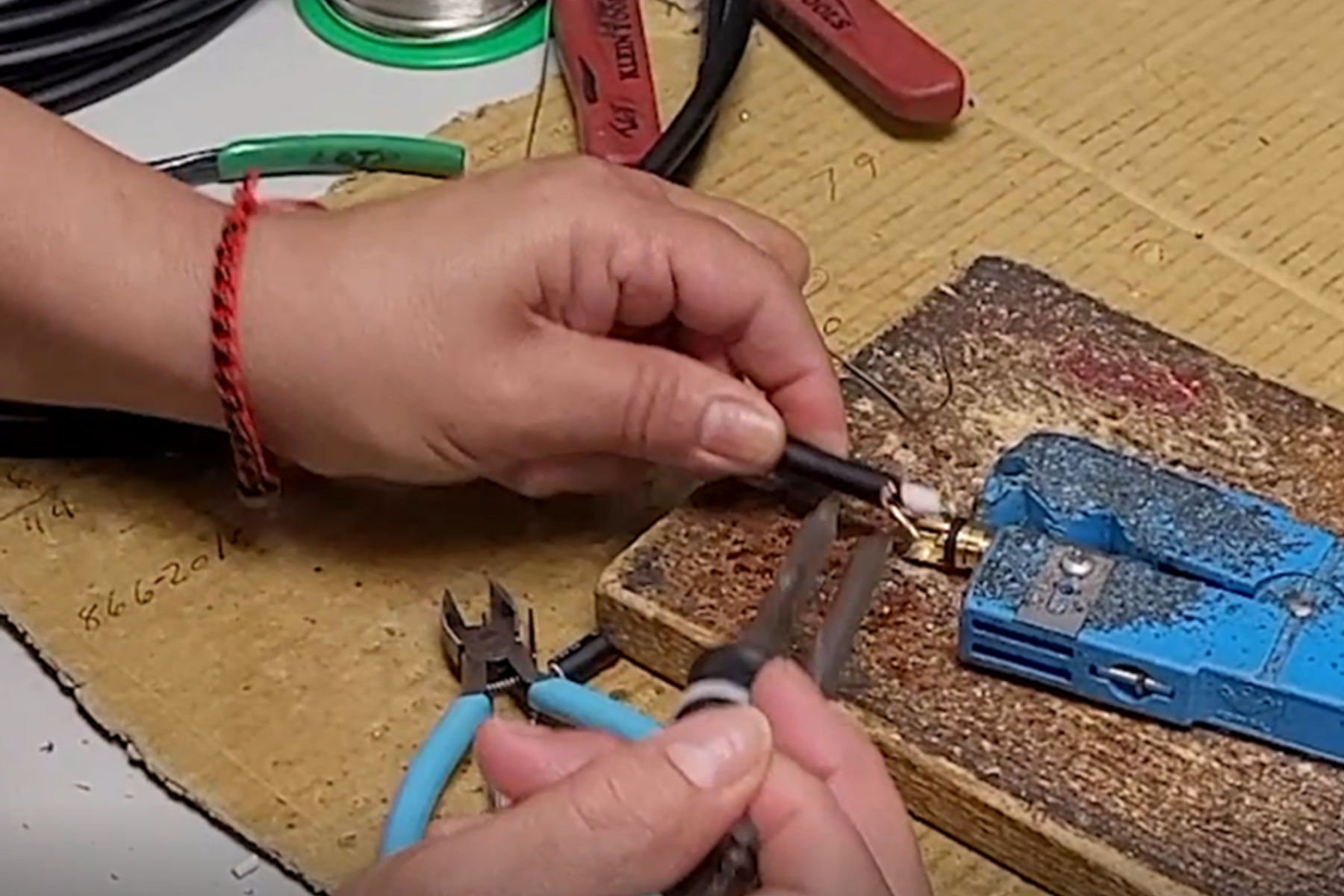
Cable Assembly Step-by-Step Process

Step 1: Mark off 5-10 inches from either end of the cable
Step 2: Using the pliers, cut off any exposed copper at the end to create a new tip
Step 3: Using the wire cutters, gently round the cable to expose the copper — careful not to cut too deep and gently pull the sheeting away
Step 4: Carefully separate the strands and gather them to one side of the cable. When done, twist them into a bundle
Step 5: Place a ¼” cable nearby to reference length. Using the wire cutters, cut the outer and inner conductors down to about an inch. Use the ¼” for reference, and if done correctly the inner and outer conductors should align with the outer and inner parts of the plug
Step 6: Using the crocodile holding clips, stabilize your cable & solder
Step 7: Using the soldering iron, apply it to the conductors. If done correctly, the conductors should be shiny and spread evenly
Step 8: Cover the tip of the plug with tape to protect any plating
Step 9: You then apply solder to create the joint between the tinned wire and the contact point. Repeat for inner conductor

When to Buy a Cable vs. Assembling Your Own Cable

For more in depth information on the makeup of cables, head over to our video titled “Do Cables Matter?”

Hosa

Digital Audio Interfaces

Bridging the Gap: When Your Digital Gear Won’t Talk to Each Other

A plain-language guide to AES/EBU, S/PDIF, and what to do when your digital inputs and outputs don’t match.


You’ve patched cables in the dark, chased ground loops, and learned the hard way which end of a TRS goes where. But digital audio has a way of throwing a different kind of curveball — one that doesn’t involve noise or levels, just a fundamental mismatch in the language your gear is speaking. Two devices, both digital, both perfectly capable, and they simply won’t connect. The reason almost always comes down to format: one is AES/EBU, the other is S/PDIF, and without something in between, you’re stuck.

This article explains why that mismatch exists, what the formats actually mean, and how to resolve it cleanly — without ever leaving the digital domain.


How We Ended Up With Multiple Digital Audio Formats

When digital audio was taking shape in the 1980s, there was no universal standard. Each manufacturer built their own proprietary digital interface, and none of them could communicate with each other. Yamaha’s format didn’t speak to Tascam’s. Sony’s didn’t speak to anyone else’s. For studios and engineers trying to build mixed-brand signal chains, it was a real problem.

The solution came from two industry bodies: the Audio Engineering Society (AES) and the European Broadcasting Union (EBU). Together they developed an open, universal standard for digital audio transmission — published in 1985 and known today as AES3, or more commonly AES/EBU. It gave the professional audio world a shared language, and it’s still the dominant format in professional gear today.

For the consumer and prosumer market, Sony and Philips developed a parallel format: S/PDIF (Sony/Philips Digital Interface Format). It carries the same fundamental audio data as AES/EBU but is designed for lower signal levels and uses connectors more common in consumer electronics — RCA coaxial jacks and Toslink optical ports — rather than the XLR connectors found on professional gear.

That split — professional gear on AES/EBU, consumer and prosumer gear on S/PDIF — is exactly why the mismatch happens. And it happens constantly.


What is AES/EBU?

AES/EBU (AES3) is the professional standard for two-channel digital audio transmission. It uses a balanced XLR connection, which gives it strong noise rejection and the ability to run long cable distances — 100 meters or more on quality cable. If you’re working with a professional digital mixer, a high-end recorder, or broadcast-grade outboard gear, AES/EBU is almost certainly what’s on the back panel.

The familiar XLR connector was a deliberate choice: it meant engineers moving from analog to digital didn’t need an entirely new cabling infrastructure. Same connector, same wiring discipline, different signal. However, it’s worth noting that AES/EBU requires a dedicated 110-ohm digital cable — not a standard microphone cable. The XLR connectors look identical, but a mic cable is typically 50–75 ohms and not designed for the high-frequency digital signal. Using one may work over short distances, but expect jitter, dropouts, or complete signal failure on longer runs. Always use cable rated for AES/EBU or AES3 digital audio. Hosa stocks a full range of AES/EBU cables built to the 110-ohm spec.

What is S/PDIF?

S/PDIF carries the same audio data as AES/EBU — the encoding is essentially identical — but it shows up in two physical forms:

  • S/PDIF Coax uses an RCA connector over a 75-ohm coaxial cable, similar to a composite video cable. You’ll find this on DACs, CD players, audio interfaces, and a wide range of prosumer gear. Always use a cable rated for S/PDIF — true 75-ohm coax, not a standard analog RCA cable. Hosa carries a full range of S/PDIF coax cables built to the correct spec.
  • S/PDIF Optical (Toslink) transmits the same data over a fiber-optic cable, which completely eliminates ground loops since there’s no electrical connection at all. It’s common on audio interfaces, soundcards, AV receivers, and powered monitors. Hosa optical cables are compatible with S/PDIF and ADAT formats.

Because the underlying audio data is the same, converting between AES/EBU and S/PDIF doesn’t mean re-encoding or degrading the signal. You’re translating the physical and electrical format — not the audio itself.

Why a simple adapter cable won’t work: AES/EBU runs at approximately 5V on a balanced 110-ohm line. S/PDIF Coax runs at around 0.5V on an unbalanced 75-ohm line. That’s a 10x voltage difference and an entirely different impedance — which is why plugging an XLR-to-RCA adapter between the two almost always results in sync failures, signal dropouts, or no signal at all. A proper format converter like the Hosa ODL-312 or CDL-313 handles both the electrical translation and the protocol handshake correctly.
Important: S/PDIF Optical uses the same Toslink connector as ADAT Lightpipe, but they are completely different formats. ADAT carries up to 8 channels with a different data structure. A digital format converter for S/PDIF is not compatible with ADAT optical, and the two should not be confused.

What Are “Bits” and “kHz”?

You’ll see digital gear described with specs like “24-bit/96 kHz.” Here’s what those numbers mean in practice:

  • Bit depth (e.g., 16-bit, 24-bit) determines dynamic range — how much space exists between the noise floor and the loudest signal. 24-bit is the professional standard and gives you significantly more headroom than the 16-bit of a CD.
  • Sample rate (e.g., 44.1 kHz, 48 kHz, 96 kHz) is how many times per second the audio signal is captured. Higher sample rates can capture more high-frequency detail and give you additional flexibility in post.

When routing digital audio between two devices, both sides must be set to the same sample rate. A mismatch produces distortion, clicks, or silence — regardless of whether you’re using AES/EBU, S/PDIF, or any other digital format. One device must also act as the clock master while the other follows: set your receiving device to “External” or “Digital” clock input to keep both sides locked and avoid pops or dropouts.


The Real-World Problem — and the Fix

Say you have a professional digital mixer with AES/EBU on its digital I/O at the center of your signal chain. You want to feed it from — or route it to — a device that only has S/PDIF: maybe powered monitors with a Toslink input, or a recorder with only an RCA digital output. Same challenge, same answer.

What you need is a digital format converter — a device that accepts a signal in one digital format and outputs it in another, entirely within the digital domain. No analog stage. No quality loss. Just a clean translation between two digital handshakes.

That’s exactly what the Hosa ODL-312 and CDL-313 are built to do.


What About Dante, AVB, and Networked Audio?

If you work in larger live sound or AV integration, you’ve almost certainly encountered Dante, AVB, or AES67 — network-based audio protocols that route dozens or hundreds of channels over standard Ethernet infrastructure. These have become the dominant architecture for large installations, and for good reason: the flexibility and channel counts they offer are well beyond what point-to-point digital formats can match.

But here’s the thing: Dante doesn’t replace AES/EBU or S/PDIF at the device level. It routes audio between Dante-enabled devices. The moment you introduce a piece of gear that isn’t Dante-capable — a legacy processor, a specific DAC, a recorder, an outboard unit — you’re back to dealing with whatever physical format is on its back panel. In many cases, that’s AES/EBU. And if the device feeding or receiving it speaks S/PDIF, the conversion problem is exactly the same as it’s always been.

AES/EBU and S/PDIF aren’t legacy formats waiting to be retired — they’re the point-to-point connective tissue that still shows up at the edges of even the most modern signal chains. Networked audio handles the routing. These formats handle the last connection.


The Right Tool for the Connection

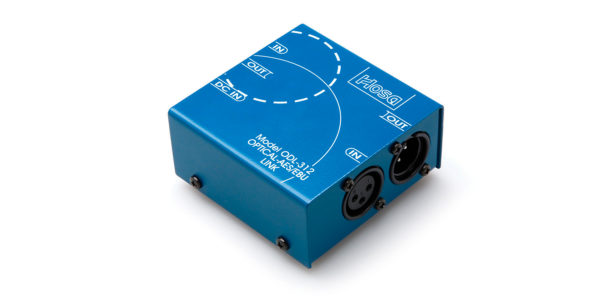
S/PDIF Optical (Toslink) to AES/EBU — Hosa ODL-312

If your S/PDIF device uses a Toslink optical connection, the ODL-312 handles the conversion to and from AES/EBU simultaneously — meaning you can run signal in both directions at once if needed.

  • 2-channel S/PDIF Optical ↔ AES/EBU, bidirectional
  • Supports up to 24-bit/96 kHz
  • Keeps the entire signal path in the digital domain
  • AC adapter included
  • SCMS disabled when converting S/PDIF to AES/EBU
  • Not compatible with ADAT Optical

S/PDIF Coax (RCA) to AES/EBU — Hosa CDL-313

If your S/PDIF device uses an RCA coaxial digital connection, the CDL-313 does the same job — clean, bidirectional conversion between S/PDIF coax and AES/EBU with no analog conversion in the chain.

  • 2-channel S/PDIF Coax ↔ AES/EBU, bidirectional
  • Supports up to 24-bit/96 kHz
  • Keeps the entire signal path in the digital domain
  • AC adapter included
  • SCMS disabled when converting S/PDIF to AES/EBU

Note: These are digital format converters, not analog-to-digital converters. They translate between digital formats — they do not convert analog signals to digital or vice versa.


Which One Do You Need?

The answer is on the back panel of your gear:

  • Toslink / optical port on the S/PDIF side → ODL-312
  • RCA / coaxial port on the S/PDIF side → CDL-313

Not sure which you have? Toslink ports are small, square optical openings, often covered by a dust cap. RCA digital ports look identical to analog phono jacks — the difference is in the signal, not the connector shape.

Either way, both units keep your audio entirely in the digital realm from source to destination. You’re not degrading the signal or adding a conversion stage — you’re just making sure both ends of the cable are speaking the same language.

Shop Hosa S/PDIF Interfaces →


Hosa

Hosa Artist Testimonials | Beau Burchell

Setting Up A Creative Space – Music Producer Edition

At Hosa, we believe the music business is the people business. This especially rings true for music producers. When actively recording artists, musicians, and bands, one single kink can ruin the entire experience for everyone. The last thing you want to think about as a music producer is why a piece of equipment, whether a console or single audio cable, isn’t working the way it should – ruining the energy of the atmosphere and potential relationship with a client.

Throughout the years, Hosa has been lucky enough to work alongside, partner with, and sponsor a diverse list of artists. 2020 was a difficult year for all of us and while many center around the industry we are proud to call home, we are first and foremost in the people business and that doesn’t limit itself to music.

Today we’re featuring Beau Burchell, founding member of Saosin and active music producer, who filled us in on what he’s been up to.

Beau Burchell, Saosin Guitarist & Music Producer, Interview

Video Transcript:
I don’t think I have one favorite part. I enjoy it all. I enjoy soldering, I enjoy building weird contraptions to make my life easier. I enjoy comparing the difference between two microphones that are the same exact model and hearing how they differ from each other. I enjoy every part of it.

My name is Beau Burchell. I am the founding member of the band, Saosin, and I produce records, mix records, everything. I’ve just always felt like I needed my own space to create whenever I want which is why having a space at home has been so appealing to me and now I just love it at any point. Especially now with kids I can put the kids to bed and after my wife falls asleep if I’m still getting that crazy itch in my brain about trying something or comparing something I can always come back out here and keep fiddling with stuff like a mad scientist until wee hours in the morning and then wake up and go to to work the next day and doing the same exact thing.

Hosa works with workflow because you don’t have to think about, you know? And those aren’t things you want to think about when you are focusing on something artistic. Or if you have a group of people or a band, especially if it’s a new relationship, the last thing you want is to plug in a cord to something and then have the band or artist think that your equipment is shotty because something doesn’t work. And it’s all because of just one little connection on a cable. You’re sitting there trying to troubleshoot, figure it out and the band thinks you have no idea what you’re doing because of this small little thing that caused you so much grief. So if you can eliminate that from the equation, you’re instantly in a better spot.

Regular mic cables and instrument cables that I use from Hosa – the reliability and the sound quality. Those are the only two things that you care about. You want it to work all the time and you want it to sound great when it does work. They check both those boxes. And I’ve pretty much switched to all Hosa edge series cables now.

Regular mic cables and instrument cables that I use from Hosa – the reliability and the sound quality. Those are the only two things that you care about. You want it to work all the time and you want it to sound great when it does work. They check both those boxes. And I’ve pretty much switched to all Hosa edge series cables now.

Popular Hosa Products for Guitarists

Hosa Edge Guitar Cable
Every electric guitarist needs a guitar cable. As Beau speaks on above, he relies on Hosa’s Edge Series cables to get the job done. Our Edge series are designed to provide a lifetime of outstanding performance.
Goby Labs Guitar Care Kit
Inevitably when you use music and audio equipment, you’re going to get some wear and grime build-up and potentially expose yourself to unwanted germs. Our Goby Labs Guitar Care Kit can help with that.
Pro Headphone Extension Cable
Our Pro Headphone Extension Cables are designed to extend the reach of hard-wired headphones. These are especially useful when playing your instrument away from your console or DAW.

Hosa

History of MIDI

What is MIDI?

By textbook definition, MIDI is an acronym for Musical Instrument Digital Interface. It’s an electronic standard used for the transmission of digitally encoded music. But what exactly does that mean?

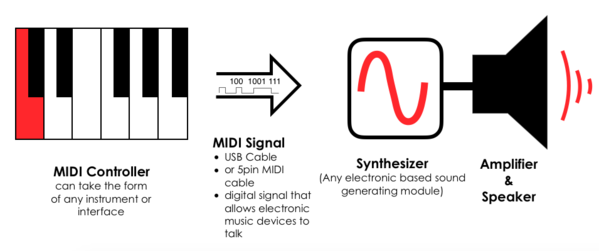
MIDI isn’t a sound or an instrument, it is simply the carrier for messages that specify the instructions of music. For example, if a chord progression is laid down via MIDI, those same chords’ notes, velocity, vibrato, panning, tempo, and pitch can be transmitted to an instrument that has MIDI capabilities.

Every time a musician plays a MIDI instrument, the exact way the musician played is transmitted into MIDI data. That data can then be transferred to a computer and played the same exact way through another MIDI instrument.

When Was MIDI Invented

In 1981, Dave Smith of Sequential Circuits, presented a paper on the “Universal Synthesizer Interface.” Just two years later, in 1983, at the winter NAMM Show*, a Sequential Circuits Prophet-600 was able to talk to a Roland Keyboard over a 5-pin cable.

*Fun fact, Hosa’s first NAMM Show appearance was just one year later, in 1984.

But in those days, polyphonic synthesizers cost thousands of dollars and one could really only get their hands on one if they were wealthy. So, Dave Smith came up with another idea; an interface so simple, inexpensive, and easy to implement that no manufacturer could refuse it. Smith helped develop it — but at the time, MIDI was widely viewed as “too slow” by peers and industry leaders… until it wasn’t.

The MIDI Manufacturers Organization (MMA) would not back down. In an industry of intense rivals, the MMA was able to hold a coalition of the most competitive manufacturers of the time. The message became clear: if MIDI is successful it would drive the industry into even greater success. The MMA was right, manufacturers were on board and immediately helped educate the market on MIDI through books and even online materials such as “Introduction to MIDI.”

MIDI Cables

MIDI cables help connect to MIDI devices. MIDI devices range from instruments, modules, computers and much more.

Hosa carries affordable and reliable midi cables in singles and doubles (for the in/out pair), we offer right angle MIDI, and we even have a MIDI to USB interface.

MIDI Interfaces

MIDI interfaces changed the way the world makes music. No longer did someone have to be in a luxurious studio to lay down guitar tracks or vocals. With the development of MIDI interfaces, emerged the concept of a “bedroom producer” — leveling the playing field for musicians across the globe. And when a “bedroom producer” wins multiple Grammys, it’s hard to justify the reason to even use a studio.

MIDI Today

Now, MIDI is everywhere. Initially just an idea that separated sound from a keyboard, it is now built into the least expensive keyboards to the most expensive studio gear. And, until just recently, the spec remained at version 1.0. MIDI data is responsible for nearly all of the music made today and, more importantly, helped lower the barrier to entry for music production. Instead of acquiring multiple instruments, use MIDI devices and simply pick out whatever sound you want. 

If you want to learn more about MIDI, head over to hosatech.com and get started using MIDI today!

- Hosa

Hosa Artist Testimonials | Aaron Stechauner

The Music Business is the People Business

The music industry isn’t just about art, it’s about people and the support we give each other. It’s part of the reason why we developed our core values; passion, drive, community, responsibility, and resilience.

Throughout the years, Hosa has been lucky enough to work alongside, partner with, and sponsor a diverse list of artists. 2020 was a difficult year for all of us and while many center around the industry we are proud to call home, we are first and foremost in the people business and that doesn’t limit itself to music.

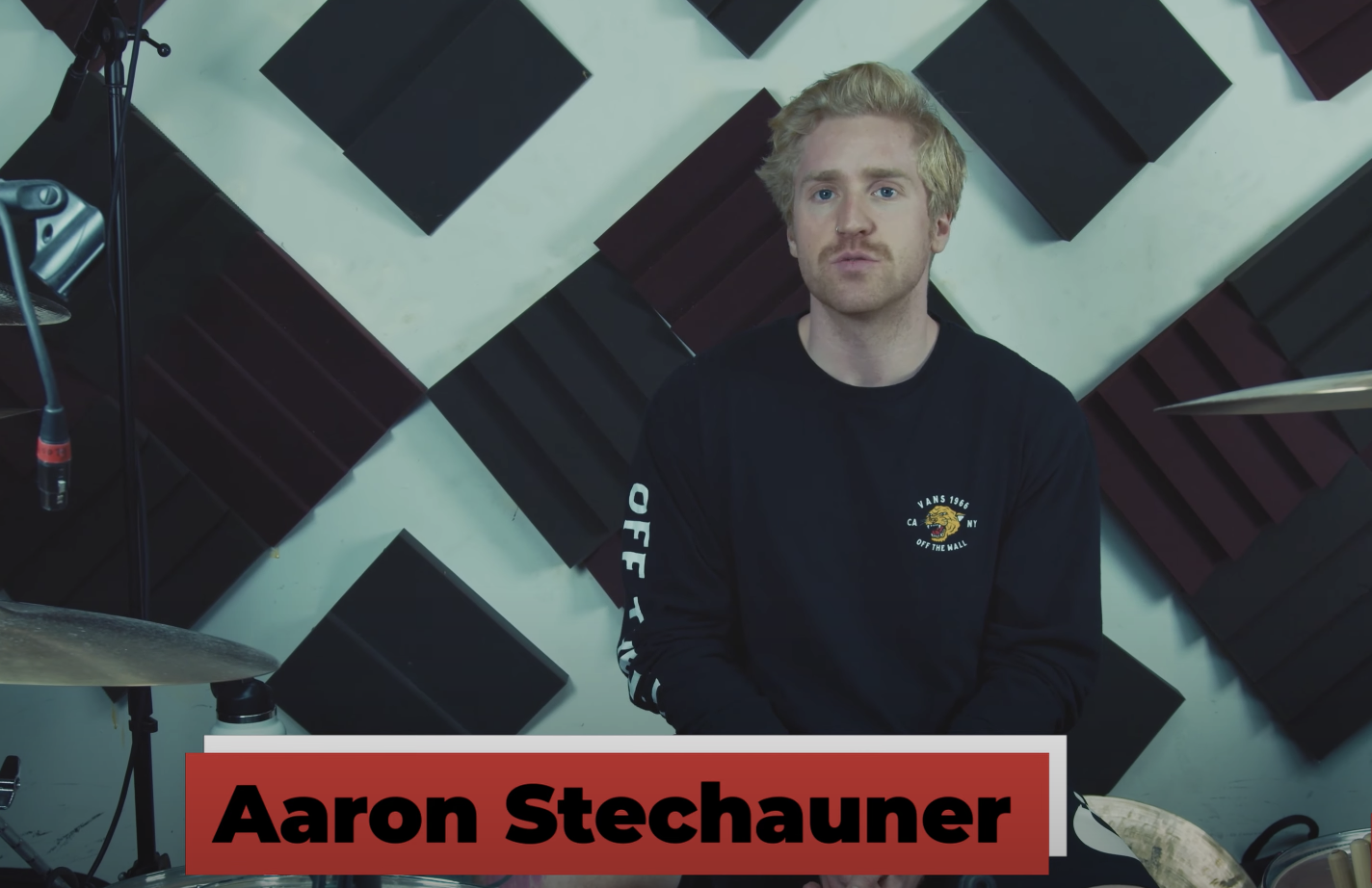
So, we connected with a few of our artist partners to help share their stories. Today we’re featuring Aaron Stechauner, drummer with the metal band Interloper, who was kind enough to let us into his personal studio.

Aaron Stechauner, drummer of Interloper, Interview

“If you’re a musician and you don’t love it, you shouldn’t do it. It takes a lot of sacrifices and it takes a toll on you.” Aaron is a teacher and a drummer. In this video, he explains how it is common for people to overlook drummers’ needs for audio cables.

Video Transcript:
I feel like if you’re a musician and you don’t love it, you shouldn’t do it. It takes a lot of sacrifices and takes a lot of toll on you and it’s tough. You kind of have to be cut out for it. There are too many obstacles to do something like this without loving it.

Hi, my name is Aaron Stechauner. I play drums for a band called Interloper. I also teach, I fill in for a lot of bands when touring. I obviously love writing, I love playing drums. Teaching’s great. All those things are great, but when I really boil it down, that’s like not only my favorite thing to do – but that’s what I’m meant to do, as like, a human being – is to be a performer, to play on stage live.

I try to count my blessings as often as I can and as often as I realize them. Probably for a lot of people, they don’t think of drums as an instrument that needs cables and electronics in the same way, you know, guitars do – electric guitar and a singer, you know, with their microphone. You have to have the cable and you have to have all that stuff. Drums, you know, are loud on their own. But even so, you have to mic them up.

I have cultivated a lot of fanbase and growth based on online media presence, so I’ve been making videos for years. That’s how I actually got picked up by that band when I was eighteen. I would upload videos to YouTube. What did I need to make all those videos? I needed microphones and I needed cables so Hosa comes into play with that. They’ve always worked – which is the important part.

Since I have started to mix all of my own material and gotten better at engineering and just understanding in general – I did notice, yeah, that the sound quality of using Hosa cables is great.

Would I recommend Hosa to others? Yeah, of course, I’d recommend Hosa to others, yeah, they’re great.

The two most important things? Reliability and a great team.

Popular Hosa Products for Drummers

Hosa Edge Microphone Cable
Drummers quite often use microphone cables to mic their sets. As Aaron speaks on above, he was able to transfer his audio signal into his DAW – for high quality sound in his YouTube videos. Our Edge series are designed to provide a lifetime of outstanding performance.
Cable Ties
Good cable management is important to good sound quality. Drum sets typically require multiple microphones and cables. Cable ties will help keep power cables separated and kink free.
Pro Headphone Extension Cable
Our Pro Headphone Extension Cables are designed to extend the reach of hard-wired headphones. These are especially useful when playing your instrument away from your console or DAW.

- Hosa